MBOX to outlook Converter

Duplicate File Cleaner

Free Duplicate File Cleaner for Windows - Find & Delete Duplicate Files

This Softaken Duplicate File Cleaner is a professional tool that removes all duplicate data from your file or folder. It has advanced features that detect duplicate content by using MD5/SHA256 hash algorithms to identify the same duplicate content, whether their name or locations are different, and it will help to remove unnecessary data from your system.

Over time, these unnecessary duplicate files consume your valuable storage space, slow down your system and make it difficult to keep your data organized. This tool is a perfect solution for all these problems. The user can scan all types of data, like music, pictures, documents, video, archives or all files. It provides you file name, size, path, and date so that users can easily decide what to delete and what to keep. This tool will increase the productivity of your work and help you work easily without any struggle.
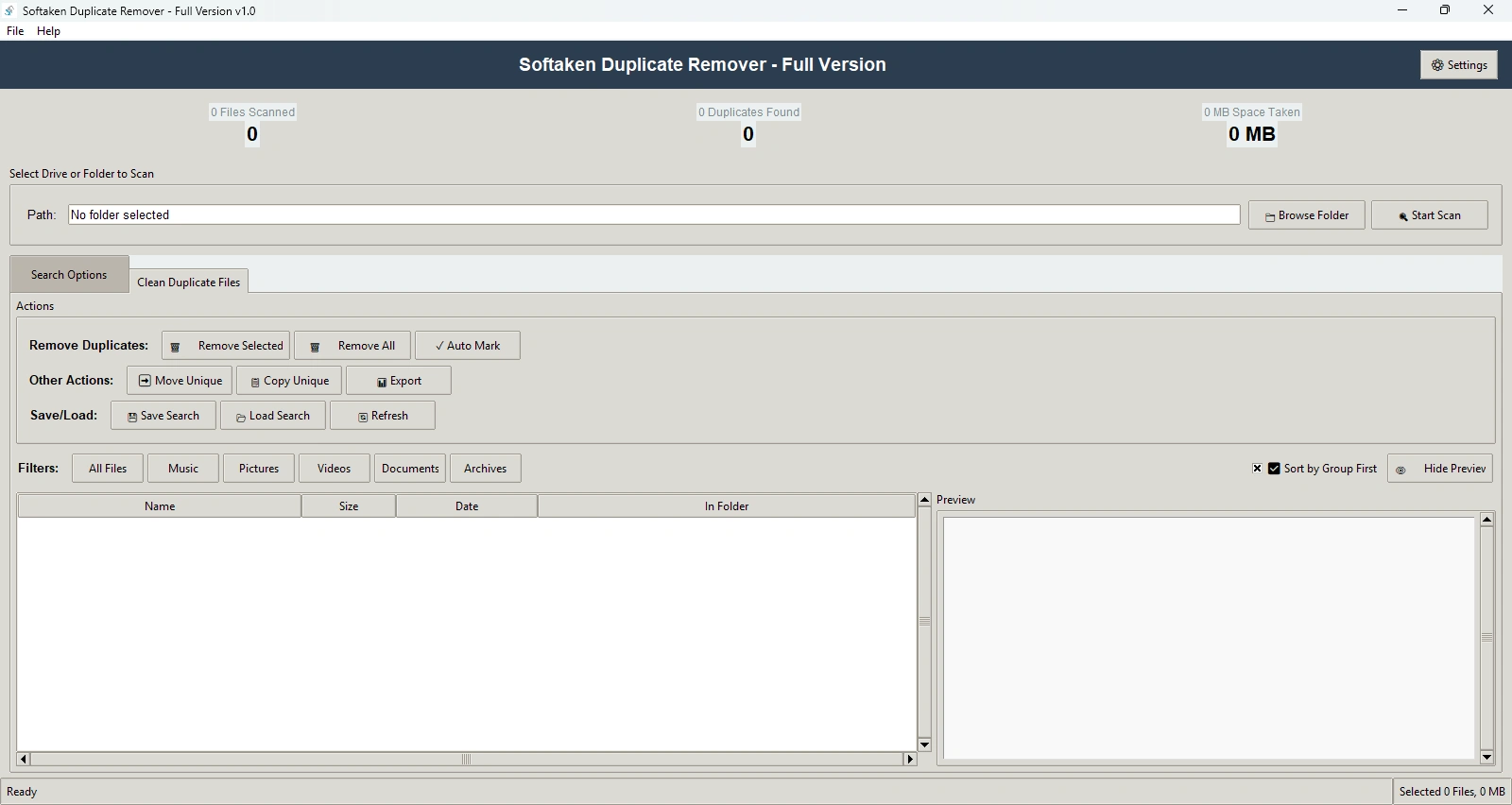
  • Smart Detection - This tool will detect content not file names to find duplication.
  • Quick Export - The User can export the scan result in CSV or text format for record
  • Instant Insights - The User can check all the data details of the data, like how many files were scanned, how many duplicates were found, and how much space they occupied.
  • Smart Filtering - This provides multiple filter options like music, pictures, videos, documents, archives & all files. The user can use the filter option according to their need.
  • Controlled Removal - The User can delete duplicate data by the auto-mark option according to their need.
  • Real-Time Progress - The User can track scanning and deletion in real-time progress.
  • Instant Preview - The user can check the preview of the data before deleting it.
  • Safe Cleanup - The data will not be deleted permanently it will first be transferred to the recycle bin so that if the wrong data is deleted the user can restore it.
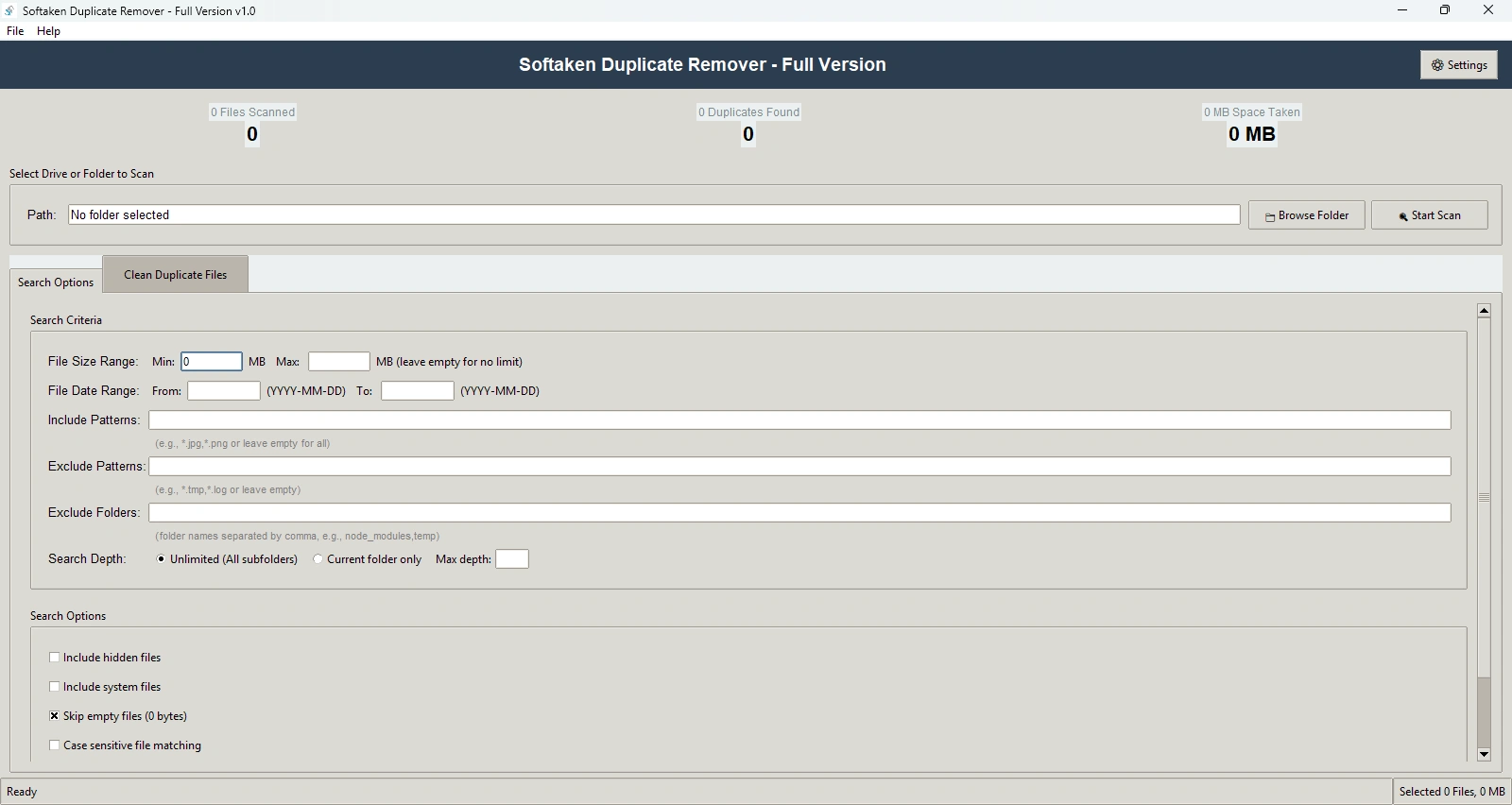
  • Deep Search - It is an advanced filter option that provides file size, data range, and include/exclude patterns for the user so they can search deeply according to their needs.
  • Auto Organize - It arranges all the duplicate data easily in groups so that users can easily review and manage it.

Perform Duplicate Files Cleaning Process smoothly

Steps to remove duplicates from Your data

Remove duplicates from Your data with this smart tool that allows users to clean duplicate files. It completes the deletion process with 100% precision.

Follow these steps to Remove Duplicates from Your Data -

  • Step 1. Before opening the application, the user must install it.
  • Step 2. Select a disk or folder by clicking "Browse" to look for duplicates.
  • Step 3. As necessary set up search parameters file size, date range, patterns, etc.
  • Step 4. Click the "Scan" button to start the duplicate detection process.
  • Step 5. Look for duplicate groups in the results list.
  • Step 6. Select which duplicates to eliminate or utilize the Auto Mark feature
  • Step 7. Choose "Remove Selected" or "Remove All" (Full Version only) to eliminate duplicates.
duplicate file cleaner

When to Use Softaken Duplicate File Cleaner

Use Softaken MBOX to Outlook PST Converter and export multiple MBOX files to PST file format. It can smoothly transfer MBOX files to Outlook 2019, 2016, 2013, 2010, and others.

Accurately identifies duplicate files by analyzing actual file content, not just file names

Unlike tools that only compare filenames this tool provides advanced MD5/SHA256 hash algorithms in which users have the option to compare file content. It means if you have multiple files with different names, but they contain the same content then it detects it. Basically, it will detect data based on content not based on file name.

Ensures secure removal by sending deleted files to the Recycle Bin for easy recovery.

One of the greatest concerns for any user is the accidental loss or deletion of important files. This tool uses safe deletion processes in which the deleted file will first go to the recycle bin. In case a file is accidentally deleted users can easily recover their data without any hassle. These features make this tool more professional and sophisticated.

Frees up valuable disk space by eliminating redundant files and improving overall system efficiency.

Unnecessary duplicate files often occupy a significant amount of valuable storage space affecting system efficiency. But this tool works to identify duplicate data which instantly removes your repeated data. Whether it's duplicate photos, songs or documents everything will be cleaned up. It's perfect for those who repeatedly get the Low Disk Space warning on their system. Storage is also optimized and the system feels lighter.

Streamline Your File Cleanup with Intelligent Automation

This tool is designed in such a way as to save the time of the users. Users don’t need to search for the folder manually. Through the smart automation cleanup, this tool scans and detects duplicate data. Whether photos, videos, or documents, it automatically identifies content. You can simply preview the files and decide what to delete. It's such an easy and fast process that your system will stay clean, and you'll get the job done quickly.

Advanced Features increase productivity

The User can remove and scan unlimited files after purchasing the full version. It removes duplicates from a thousand files, and users can remove whole duplicates from external drives without any restrictions. Those who undertake routine cleanups will find this independence very helpful. A great option for corporate teams, IT administrators, and photographers. Better speed and immediate results are also provided by the unlimited version. You have complete control over your data, including the ability to scan, compare, and remove it.

Users have the option to test the product and then purchase it. An honest chance to trial before you buy is provided with the demo version. With real-time scanning and viewing, you may test the tool for free. This helps you comprehend the software's accuracy, speed, and interface. This tool is helpful for:

  • System Administrators
  • IT Professionals
  • Photographers & Videographers
  • Students & Home Users
  • Designers & Content Creators
  • Corporate Users
  • Data Managers
duplicate file cleanup

Detect duplicate data in different folders

delete duplicate files

This tool works to detect and remove duplicate content from different files or folders, like:

  • Scan multiple

    This tool scans multiple folders at once to find duplicate files

  • Scan all types of data

    This tool works with all types of data like music, pictures, videos, documents, archives, or even all files together.

  • Detect data across different locations

    Regardless of whether the files are on multiple disks, folders, or network sites, it finds duplicates across several places.

  • Smart Scanning

    It identifies data based on content, not based on the file name.

  • Preview duplicates

    The User can check the preview before deleting the data.

Notable Features of Duplicate Files Remover


Features

Precision Scanning

Both MD5 and SHA256 hash algorithms create a unique code for a file. This allows the tool to instantly identify which files are exactly the same regardless of their name or location. This tool matches 100% data, and it is a secure and safe tool users don’t need to worry.

Features

Smart Sorting

This tool provides an option to sort your data by using music, Pictures, Videos, Documents, Archives or All Files, which processes the target cleanup and focusing only on photos or only on music saves time. The user just needs to use the filter option and customize their data according to their requirement.

Features

Instant Preview

This option is very helpful as it shows a preview of the data to the users. Before deleting, it provides a proper preview, like name, size, data and full path which prevents accidental deletion of important files.

Features

Deep Search

This is the best feature for expert users You can customize your search file size range (min/max MB), date range (from/to), or include/exclude filters. You can also skip specific folders that contain important data. You can even control the search depth a quick search or a deep scan, it's up to you.

Features

Instant Insights

After scanning all the detail statistics of data will be created in this feature Total files scanned, number of duplicate files found and how much space the duplicates are taking up everything in one place. Dashboard is easily understood by all types of users.

Features

Quick Export

User can scan and export their result in CSV and Text formats. Users can easily maintain records, share with their team members, save and use it for future reference. Exported files contain file path, size, and duplicate groups information it is also very useful for business like audit verification etc.

Features

Auto Organize

Duplicate data will automatically be arranged in groups, and each group shows which files are identical for easy comparison. This tool will automatically mark “KEEP” and “DELETE” so that users can easily identify. In case it identifies wrong data, then the user can manually change it.

Features

Safe Cleanup

This feature gives users full control. You can manually decide which duplicates to delete or use "Auto Mark" to allow the tool to automatically select the duplicates. This tool smartly cleans up all the unwanted data in just a single click and without creating any hassle.

Features

Power Performance

This tool uses multi-thread scanning which means it scans multiple data at a time. This makes the entire process lightning fast even if you have terabytes of data. The algorithm is optimized so you get both speed and accuracy. Thanks to its lightweight and portable design the system doesn't slow down. Professional-level performance without installing heavy software.

Features

Search Memory

You can save your search settings and results and reuse them later. Search Memory” refers to the tool’s ability to retain previously used search parameters, filters and configurations, allowing users to quickly reapply the same settings in future sessions without manually setting them again.

Features

Easy Transfer

User can move or copy their unique data according to their requirement. It features work to transfer their data to another system. If you are from an IT background and handle multiple devices, then this tool is the best way to increase the productivity of your work.

Features

Modern Interface

It has a very clear interface beginner can also understand easily. The buttons, menus, and layout are so simple that even new users can use the tool easily without any guidance. It shows you real-time progress, grouping, and preview. It is designed in a modern way so that beginners can easily use it.

Technical Information

Download and remove duplicate files on your Windows system.

MBOX to PST

Software Download


Size 14.8 MB
Version 1.0

Free Trial - Download free trial of the program for examining it

4.8
471 Ratings
Trial Limitations
Download the free trial of Duplicate File Cleaner and judge the performance of the software prior to investing in it. You will get limited export features to delete few file from folder with the trial version.

System
Specifications

Hard Disk Space 500 MB of free hard disk space

RAM
Minimum 512 MB is required

Processor
Intel® Pentium 1 GHz processor(x86,x64)

Supported
Editions
Win 10 & All Below Windows Versions

Comparison of Trial & Full Version

MBOX Converter tool Free & Full Version comparison are given here for users:

Product Features Free Version Full Version
Delete Duplicate Files
Apply File Type Filters (Images, Videos, Documents, etc.)
Smart Sorting (by Size, Type, or Name)
Instant Preview Before Deletion
Deep Search (MD5/SHA256 Content Match)
Save/Load Search Results
Export Duplicate Report
Supports All Windows Versions
24×7 Technical Support & 100% Secure
Price Free $29

Valuable Customer Reviews

Transforming Your Online Reputation into a Business Asset

Online customer reviews work as a great avenue to grab customer’s attention and boost sales. They are tremendously important for the majority of customers and for securing online visibility of a business. Check, what our customers have to say...

FAQs

HAPPY CUSTOMERS

at
dell
disney
hit
ibm
ieee
oracle
org
pan
samsung
stanford
ups
video
west