Vcard Viewer

JSON to Multiple Format Converter

Convert JSON files into multiple standardized formats such as CSV, XML, SQL, and many more. JSON converter software is a strong consideration as a tool to convert JSON files into multiple formats, in particular, including CSV, XML, YAML, TXT, JSON (Pretty), SQL, HTML, etc. It is a user-friendly software that helps users convert JSON files into multiple formats in a few clicks without much hassle. This tool is loaded with high-tech, advanced, and enhanced features which has been tried and tested by professionals for the solution of JSON conversion instantly. This tool is a preferred option for users seeking reliable and secure software for performing conversions. It is packed with high-performance algorithms and an engaging interface that makes it convenient to use.

Whether processing individual files or large batches, our tool delivers efficient performance. It maintains 100% data integrity during conversion and after it, without corrupting any file structure and quality. It is a game-changer for professionals like developers, students, researchers, data analysts, and businesses. It is indisputably one of the top utility tools for converting JSON files into multiple file formats.
  • Our tool migrates all JSON files to other formats with 100% data integrity and preserves the quality of the files.
  • It fully preserves folder structure without any loss in the nature of the data converted.
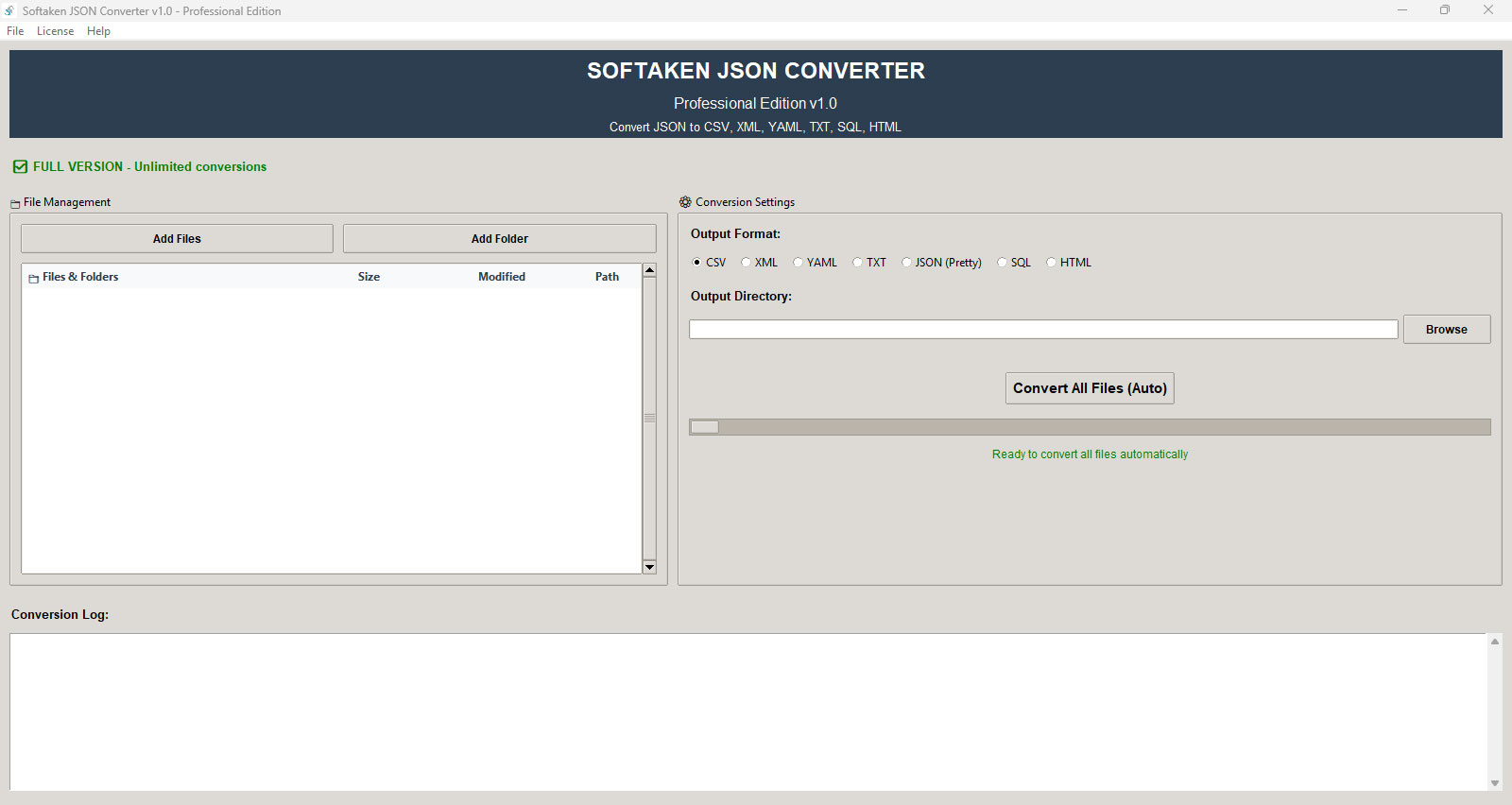
  • Structured file management with a professional Tree View component enabling visual directory traversal, automatic expansion of directory nodes, and built-in file verification processes is the specialty of this tool.
  • A free trial is available for users to experience the demo with a 10-record limit, and unlock full, unrestricted functionality with the licensed version.
  • An extensive logging system is present as it provides structured logging with timestamped entries, success and failure statistics, and detailed error reports for each conversion task.
  • Our tool displays a real-time progress bar and generates detailed logs to track conversion status and operational flow.
  • It can work with single and batch files, processing hundreds of files without much hassle. Our tool is specially developed to handle all this work efficiently.
  • This tool ensures the implementation of automated validation of JSON files to ensure data conformity, accompanied by detailed error messages for any validation failures.
  • JSON converter software enables single-action conversion of all detected files via automated discovery, eliminating the need for manual input.
  • It works without any file size limitation as it has the feature of unlimited file processing, in which users can easily convert their large files without any interruption.
  • A memory-efficient tool designed for high-performance data processing with minimal memory footprint, preventing overloads and runtime failures.
  • Guarantees complete data accuracy and structural preservation throughout the conversion process, regardless of output format.
  • Migrates JSON file data to multiple formats, namely: XML, TXT, YAML, CSV, SQL, JSON (pretty), and HTML formats.
  • Built with Python and featuring a modern design, it delivers a visually clean, interactive UI built with responsive and user-first design standards.

Steps to Converter JSON

The JSON converter tool is tailored to convert all single or batch JSON files into 7plus standardized formats such as CSV, SQL, XML, TXT, YAML, and many more. While preserving all the attachments, unique data, structure, and nature of the file in just 4 simple and easy steps of conversion-

  • Step 1. Download Softaken JSON converter software and check the preview.
  • Step 2. Run the software and select the, add JSON file or folder option.
  • Step 3. Choose the desired format and location.
  • Step 4. Now hit the button, convert all files to start the conversion, and it's done.
json converter

Why work with JSON Converter Software?

When you need to convert a JSON file format to other formats

As some systems does not support JSON natively and requires data in other format such as CSV, TXT, XML, YML and SQL for the support that when our JSON converter software comes in handy and convert all single and batch data from JSON file format to other formats, and handle compatibility with other systems, enhances interoperability, usability, and efficiency depending on the target environment or use case.

Demand for batch file conversion

JSON, being a text-based format, can become inefficient and bloated when dealing with large datasets. In performance-sensitive environments, such as mobile applications. But this conversion software manages it all and converts single or batch files to other formats easily without any storage or performance problems, without losing any data or the structure of the file.

Time efficient

In this fast-paced world, time management is very important, but JSON format is not efficient enough to help users convert all the JSON files into other formats with just a single click. Without any technical knowledge or manual selection, as this software is automated.

When intelligent file management is needed

This software shows a user-friendly and professional interface with folder structure display, with file validation, and also provides auto expansion mode for the users, for a hassle-free use with technical backup support

Preservation of folder structure

This converter software is a great help when users need a highly functional software to convert JSON format files into other format files for their convenience without disturbing the original folder hierarchy in the output, making it effortless to manage the converted files.

json-converter

Conversion formats offered under JSON Converter Software

jso

This software converts JSON files into more than 7 other formats, such as CSV format, XML format, YAML format, TXT format, JSON (Pretty), SQL format, and HTML format. Each format serves a special purpose in different industries, and that's why each conversion is valuable and matters a lot. Here we are listing the valuable features of each of the formats so you can understand them in detail-

  • XML format: this format supports a technical standard for data exchange, enterprise applications, and cloud services are broadly used in healthcare, government, and banking sectors; it ensures the seamless incorporation with enterprise systems, APIs, and legal applications that demand structured data exchange.;
  • YAML format: It is a human-friendly configuration format, famous among Docker, Kubernetes, DenOps, and CI//CD pipelines for configuration supervision, as it is necessary for modern cloud infrastructure, automated deployment pipeline, and container orchestration.
  • CSV format: : highly demanded, well-suited for data import, Excel analysis, and spreadsheet application, essential for data visualization, business, and reporting. It enables seamless data analysis in end Power BI, Tableau, and other BI tools for business reporting and insights.
  • SQL format: it is a database-ready format for direct transfer into PostgreSQL, SQLite, MySQL, and other database systems. It allows direct database transfer, making data conversion and system upgrade fast, seamless, and more stable.
  • TXT format: It is a universal text format documentation, simple, and logs data storage compatible with any text editor or system.
  • HTML format: a format that is web-ready for displaying data in browsers, generating documentation, and creating reports on websites..
  • JSON (Pretty): It is formatted for readable JSON with proper indentation. Necessary for debugging, documentation, and human-readable data presentation.

Distinct Features of JSON Converter


There are numerous key features of the JSON converter, as listed below, for a better understanding:

Features

All in One Format Conversion

Our conversion tool offers multi-format conversion in 7plus output format and converts JSON files to YAML, TXT, SQL, XML, JSON (Pretty), and HTML. The JSON file format is good for Web data, but diverse tasks require diverse formats. It is a useful tool for data analysts who can export JSON to CSV for use in Excel or Power BI, and a web designer can convert it to HTML for generating responsive reports or tables, as it makes all the tasks much more manageable and precise in nature for the users.

Features

Effortless Conversion with a single click

By launching this software on your system, load your file or folder, and with just one single click, users can effortlessly convert all the JSON files into CSV, YAML, TXT, SQL, and other formats instantly while preserving all the data and quality of the files without any hindrance in the process. This feature makes our tool perfect for users who prefer to work efficiently while maintaining the quality and structure of the project.

Features

Auto-Vslidation with real-time error alert

This software carries a feature of automatic JSON validation with error reporting, as it detects corrupt JSON file data before the conversion and highlights detailed error texts. This prevents the corruption of the output and the unproductivity of the time. It is a must for students and researchers who are running a data conversion for their projects or research, as it can show the mistakes and make it easy to fix; it can be missed by the human eye, but not with this software's scanning and auto-detecting feature.

Features

Batch or Individual file Conversion

It is packed with a feature of bulk or individual conversion of JSON files or folders into other formats in one go, swiftly without lagging or crashing in minutes, while saving time and unwanted delays that a user might face in the manual conversion of JSON to other formats throughout the process. By this feature, users can enjoy early and time-efficient work for organizing large datasets, as it helps in organizing more than 1000 JSON log archives in business to TXT for compliance, and also converts the research team with datasets spread across subfolders all at once instead of one by one.

Features

Advance tree view Navigation with Efficient file Management

This software carries an advanced and professional GUI, which shows files in a minimization tree view. It helps in managing easy browsing, selecting, and managing a bulk of directors. It works in a structured view of Projects and converts desirable folders, while working JSON logs quickly identifies the file to convert using the folder in tree view format and makes it organized, easy to navigate, and precise for the users to use without the need for technical support and hassle.

Features

Sleak, polished, and Highly Responsive GUI

It carries a user-friendly, high-tech, simple yet polished, highly responsive user interface with a modern design that is very easy to use on all screen sizes without any professional knowledge requirement, as it saves the learning process and makes the software easily usable for professional and non-professional users. It makes sure that all the steps are simple to use and easily understandable for the users, for instance, task completion without any need for manual or software information.

Features

Absolute Data Security

Our software is highly designed for the protection of data in files during the conversion, and it ensures 100% data security, especially for confidential and sensitive data. This software runs even without internet, as it can process locally, and all the data is backed up so that files never leave your device or data loss happens during the conversion process. As it carries this feature, it is perfect to be used in healthcare and legal firms, so it can convert JSON to XML files to keep everything local and take care of the sensitive data for the users.

Features

Real time Progress tracking and Data Logging

Our software shows all the progress bars, logs with timestamps, success, and failure attempts as to what exactly happened during the process. It is well used by project managers and developed in a way that it can track and trace the conversions of numerous files, with logs showing success and failure.

Features

Optimized High Performance and Large Database

It has an efficient Python backend and has advanced memory management, which converts bulky files without crashing and slowing down the system, while preserving all the structure and format of the files. Users do not have to worry about the misplacement and loss of data during conversion, as it backs up every file. It is perfect for developers and data engineers to convert loads of JSON into SQL format for fast DB and JSON to CSV without memory error or log.

Features

Lincenced for Commercial users

It offers boundless file conversion, full of features, and business licensing for commercial use. It works well for professional, enterprise, and client-facing projects and can be used in startups and software agencies for client data conversion, protection, and incorporating it into their internal data for processing the flow of work without restriction and license compliance. It makes all the conversions free of manual process with automated features that work independently on its own software.

Features

Free Trial Version

As a user centric software it offers no cost demo version for the conversations of 10 JSON file format to other formats with most of the valuable features mentioned in our list, so that users can test and try this software and judge it according to their desire before investing in this high tech, advanced, modern, and packed with all the essential features that a conversion tool is supposed to have to convert all bulky or individual JSON file formats into other format namely, CSV, HTML, YAML, TXT and many more.

Features

24*7 customer support

On top of all these features, we understand the value of customer support, which is why we are available 24*7 for customer support to our users if any problem or query arises during the download or conversion process for seamless and hassle-free work. We make sure to solve all problems of our users and are always open to their advice.

Technical Information

Download and install Softaken Software JSON Converter

archive-converter

Software Download


Size 114 MB
Version 1.0

Free Trial – Softaken Software JSON Converter Software free download to test the functionality of the tool.

4.9
249 Ratings
Trial Limitations
The free demo version of JSON to Multiple Format Converter Software is provided for testing and evaluation purposes only. With the demo edition, users can convert a limited number of JSON records into supported formats. To convert and manage multiple JSON files without restrictions and to unlock all advanced saving options, upgrading to the licensed version is required.

System
Specifications

Hard Disk Space 500 MB of free hard disk space

RAM
Minimum 512 MB is required

Processor
Intel® Pentium 1 GHz processor(x86,x64)

Supported
Editions
Win 10 & All Below Windows Versions

Comparison of Trial & Full Version

Feature comparison of JSON Converter Software– demo and license version

Product Features Free Version Full Version
File Processing Single File Unlimited
Record Limit 10 file only Unlimited
Batch Processing Not available Available
Folder Import Not available Available
Output Formats Yes Yes
Data Validation Yes Yes
Progress Tracking Yes Yes
Folder Structure Not available Available
Price Free $29

Valuable Customer Reviews

Transforming Your Online Reputation into a Business Asset

Online customer reviews work as a great avenue to grab customer’s attention and boost sales. They are tremendously important for the majority of customers and for securing online visibility of a business. Check, what our customers have to say...

FAQs

HAPPY CUSTOMERS

at
dell
disney
hit
ibm
ieee
oracle
org
pan
samsung
stanford
ups
video
west